As my forum at doesn't seem to be generating quite as much interest or registered users only 2 apart from my user account and a test user account that I use for testing changes out, I'm giving the forums until the end of March to generate registered users and active threads other than the ones that I'm starting to try and get people using the forums.
If things don't change by the end of March then I'll discontinue the forums and just concentrate on the blog.
I'd like to give my loyal blog readers the chance to change outcome of my forums, the blog has had a huge surge in viewers/visitors with 200 hits yesterday and as I write this post I'm on a record breaking 533 hits on my site which is the biggest ever recorded hits since I started the blog and would like the forums to have a shot at the success that the blog is currently having.
So readers please register and use the forums and prove to me that they deserve a chance at success.
Roland

Monday, 31 January 2011

OpenSuse 11.4 Milestone 6 Released
With the announcement that OpenSuse 11.4 has hit Milestone 6 I thought that I would start a series of posts on penSuse 11.4 M6.
The OpenSuse 11.4 Portal can be found here, the openSuse 11.4 M6 press release can be found here and finally the OpenSuse 11.4 M6 iso can be downloaded from here.
The big news with OpenSuse 11.4 is that it will include KDE 4.6.0, this is a welcomed addition as OpenSuse 11.3 was supposed to include KDE 4.5 but it never made it into the release and it had to be installed as a software update that could never get to work properly.
OpenSuse 11.4 M6 is availablee to download now from, OpenSuse 11.4 RC1 is scheduled for release on 02/10/11 and the final release is scheduled for release in March.
Once My download allowance resets on 02/03/11 I'll download 11.4 M6 and install it on my Netbook so watch this space for a full review of openSuse 11.4 M6 soon. In the mean time visit the OpenSuse 11.4 Portal and download the OpenSuse 11.4 M6 iso and create your very own OpenSuse 11.4 M6 DVD and try out this release of OpenSuse.
In the meantime feel free to talk about everything relating to in the OpenSuse 11.4 M6 thread in my forum
Roland
The OpenSuse 11.4 Portal can be found here, the openSuse 11.4 M6 press release can be found here and finally the OpenSuse 11.4 M6 iso can be downloaded from here.
The big news with OpenSuse 11.4 is that it will include KDE 4.6.0, this is a welcomed addition as OpenSuse 11.3 was supposed to include KDE 4.5 but it never made it into the release and it had to be installed as a software update that could never get to work properly.
OpenSuse 11.4 M6 is availablee to download now from, OpenSuse 11.4 RC1 is scheduled for release on 02/10/11 and the final release is scheduled for release in March.
Once My download allowance resets on 02/03/11 I'll download 11.4 M6 and install it on my Netbook so watch this space for a full review of openSuse 11.4 M6 soon. In the mean time visit the OpenSuse 11.4 Portal and download the OpenSuse 11.4 M6 iso and create your very own OpenSuse 11.4 M6 DVD and try out this release of OpenSuse.
In the meantime feel free to talk about everything relating to in the OpenSuse 11.4 M6 thread in my forum
Roland
Free Forum Hosting
If you are looking to run your own online forum then there are a lot of free hosting services out there this google search lists all the free hosts out there. My chosen free forum host is freeforums.org. You get a lot for free and there is a paid upgrade that gives you a custom domain, removes all adverts and copyright and gives you a forum backup option. I'm currently on the free option as my forum hasn't really taken off enough to require most of the paid upgrade options yet.
So if you are considering setting up a forum for your blog, community group, sports team or website and want to give it a go without committing to anything paid until you know that it will be worth the money then try freeforums.org as you get your forum for free an can expand it with any of the paid upgrades that you require.
Roland
So if you are considering setting up a forum for your blog, community group, sports team or website and want to give it a go without committing to anything paid until you know that it will be worth the money then try freeforums.org as you get your forum for free an can expand it with any of the paid upgrades that you require.
Roland
Saturday, 29 January 2011
Playing Blu-Ray and HD DVD Video
I've had a comment on one of my previous posts asking if Ubuntu Linux can play Blue-Ray Discs.
This is the complete answer to that comment taken from the Ubuntu Documentation from the Ubuntu help website at
It is possible (although a little cumbersome) to play HD DVD and Blu-Ray films on Ubuntu.
Audio in some films may not yet be supported.
The AACS 'Digital Rights Management' (actually, Digital Restrictions Management) system in most HD-DVD and all Blu-Ray discs attempts to stop consumers from exercising fair use rights, including:
Blu-Ray or HD DVD player applications require their unique player (or 'device') key to play discs. These keys are issued by AACS-LA to approved manufacturers that implement the restrictions above. This player key can decrypt each film's volume key, which in turn can decrypt the film's content to play it.
However the AACS DRM is ineffective and does not successfully prevent any of these things.
Legal Notice Patent and copyright laws operate differently depending on which country you are in. Please obtain legal advice if you are unsure whether a particular patent or restriction applies to a media format you wish to use in your country.
None of the software below is supplied or endorsed by Ubuntu.
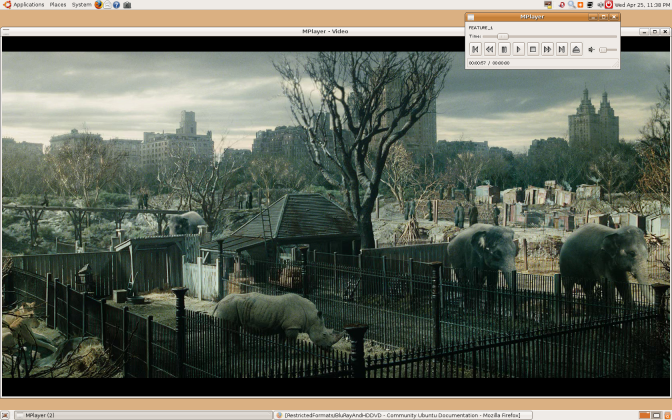
Ubuntu 9.10 contains a version of Mplayer that is capable of reading decrypted Blu-ray files.
Many HD DVD and all Blu-Ray discs use DRM. For these discs, you'll need:
As an easier alternative to the DumpHD method, you can try the MakeMKV program. The program contains a decryption key that has not been revoked, and may have more success in ripping your disc. It is not a perfect solution, however, because the main backend of the program is closed-source, and MakeMKV is not able to remove the BD+ protection on certain discs. Using MakeMKV, however, is often easier than using DumpHD.
A guide to easily initialising and watching Blu-ray discs with MakeMKV can be found here:http://themediaviking.com/software/bluray-linux/

If you're not watching a movie at this point, the disc needs to be decrypted.

Select the disc as the source (a directory somewhere beneath /media/Film Name and a directory like /tmp to save the movie content.
You can proceed onto the next step once FEATURE_1.EVO has started decrypting.

Nvidia 8000 series and above, excluding 8800 cards, support Video Decode and Presentation API for Unix (VDPAU). This allows the Nvidia GPU to take on some of the decoding load.
Mplayer in Ubuntu 9.10 supports VDPAU. You will also need the nvidia-185-libvdpau package.
When you have a decrypted Blu-ray/HD-DVD filesystem on your hard disk, you can run the following command:
The bluray iso file is in udf format instead of iso9660. Therefore you need to mount it using the udf type:
Some files require odd workarounds - for instance, the Pirate Of The Caribbean trilogy requires you to specify the frame rate with the "-fps" option (i.e. "-fps 25" for PAL) and may start with the wrong language selected (you can cycle through them by hitting the # key).
Depending on the speed of your computer, you may need to alter the AV Sync during playback, using the - and + keys.
You can go to full-screen in Mplayer by pressing the F key.
You generally get smoother playback without a compositing window manager (so turn off Compiz).
Some discs (like The Boat That Rocked) require the latest Mplayer from SVN.
Freedom to Tinker article on AACS decryption - A simple explanation of the DRM used in HD DVD and what BackupHDDVD (and BackupHDDVD C++) do.
Linux UDF project containing UDF-2.50_linux-2.6.20.patch, the UDF 2.5 filesystem driver.
Release announcement for BackupHDDVD C++
Doom 9 Forum thread on playing HD DVD disc content with Linux mplayer SVN
Wikipedia article on AACS, used to restrict users rights on HD DVD and Blu-Ray
Why you should boycott Blu-ray and HD-DVD
The Mplayer man page
Post thanks to https://help.ubuntu.com/community/RestrictedFormats/BluRayAndHDDVD
Roland
This is the complete answer to that comment taken from the Ubuntu Documentation from the Ubuntu help website at
It is possible (although a little cumbersome) to play HD DVD and Blu-Ray films on Ubuntu.
Audio in some films may not yet be supported.
The AACS 'Digital Rights Management' (actually, Digital Restrictions Management) system in most HD-DVD and all Blu-Ray discs attempts to stop consumers from exercising fair use rights, including:
- Playing purchased Blu-Ray and HD DVD films using Open Source software.
- Playing films using standard digital (DVI) or analog (VGA) cables and monitors, which generally do not support HDCP DRM, without a 75% reduction in resolution.
- Fast forwarding or skipping advertisements.
- Playing imported films, including when local equivalents may be overpriced or not available.
Blu-Ray or HD DVD player applications require their unique player (or 'device') key to play discs. These keys are issued by AACS-LA to approved manufacturers that implement the restrictions above. This player key can decrypt each film's volume key, which in turn can decrypt the film's content to play it.
However the AACS DRM is ineffective and does not successfully prevent any of these things.
- The player key for the xBox 360 HD DVD drive is known publicly, and has around 500,000 results on Google.
- Player keys for all Windows based software players, such as WinDVD and PowerDVD are known publicly. These can be used to find the volume keys for discs that don't have newer keys than those discovered. While these applications now have new keys (and future HD-DVD and Blu-Ray discs won't play with the old keys), it's likely the new key will be discovered too as all players must store their keys in memory at some point.
- The volume keys needed to play many released films are known publicly, due to the above. Even without a licensed player key, Linux HD-DVD and Blu-Ray software can use these to play discs.
Legal Notice Patent and copyright laws operate differently depending on which country you are in. Please obtain legal advice if you are unsure whether a particular patent or restriction applies to a media format you wish to use in your country.
Requirements
None of the software below is supplied or endorsed by Ubuntu.
- An HD DVD drive. The Xbox 360 HD-DVD player works well. Log into Gnome and then plug in the player. DVDs and CDs will work out of the box, HD-DVDs require the additional steps below. OR
- A Blu-ray drive.
Ubuntu 8.04 Hardy Heron
- A UDF 2.5 filesystem driver (the UDF driver included up to 8.04 Hardy Heron only supports UDF 2.0).
For 9.04 and earlier ONLY
- A current subversion release of MPlayer
- A current subversion release of FFMPEG. Try here for .deb files.
Ubuntu 9.10 contains a version of Mplayer that is capable of reading decrypted Blu-ray files.
Many HD DVD and all Blu-Ray discs use DRM. For these discs, you'll need:
- DumpHD to perform the decryption necessary to play the film.
- The sun-java6-bin package. See Installing Software.
- A current keydb.cfg file, which contains the decryption keys required to your film: keydb.cfg for HD-DVDs, Blu-Rays.
- Around 30GB of temporary disk space for HD-DVDs and 50GB for Blu-Rays.
Easy Alternative
As an easier alternative to the DumpHD method, you can try the MakeMKV program. The program contains a decryption key that has not been revoked, and may have more success in ripping your disc. It is not a perfect solution, however, because the main backend of the program is closed-source, and MakeMKV is not able to remove the BD+ protection on certain discs. Using MakeMKV, however, is often easier than using DumpHD.
A guide to easily initialising and watching Blu-ray discs with MakeMKV can be found here:http://themediaviking.com/software/bluray-linux/
Playing the Movie
- Put an HD-DVD or Blu-Ray disc in the drive. The disc should appear on the Gnome desktop.
- If using HD-DVD, try and play the disc. R&B Films, Fox Pathe/Studio Canal, EMS GmbH and other studios produce HD DVD discs without DRM, allowing them to be played without any of the restrictions mentioned above. The films content is in .EVO files in the 'HDDVD_TS' folder on the disc. Specify the video codec to use:
mplayer -vc ffvc1 /media/KING_KONG/HVDVD_TS/FEATURE*EVO
If you're not watching a movie at this point, the disc needs to be decrypted.
- DumpHD can decrypt the disc. Ensure you have a large amount of disk space available (around 30GB, and run):
sudo ./dumphd.sh
Select the disc as the source (a directory somewhere beneath /media/Film Name and a directory like /tmp to save the movie content.
You can proceed onto the next step once FEATURE_1.EVO has started decrypting.
- Play the film from your hard disk. Specify the video codec to use:
mplayer -vc ffvc1 "/tmp/King Kong/HVDVD_TS/FEATURE*EVO"
- If your disc is a Blu-ray and still doesn't work, it might be protected with BD+; it is possible to decrypt it using these tools.
Playback using VDPAU acceleration
Nvidia 8000 series and above, excluding 8800 cards, support Video Decode and Presentation API for Unix (VDPAU). This allows the Nvidia GPU to take on some of the decoding load.
Mplayer in Ubuntu 9.10 supports VDPAU. You will also need the nvidia-185-libvdpau package.
When you have a decrypted Blu-ray/HD-DVD filesystem on your hard disk, you can run the following command:
H.264 disc
mplayer -vc ffh264vdpau -vo vdpau ~/BDMV/STREAM/00001.m2ts
VC-1 disc
mplayer -vc ffvc1vdpau -vo vdpau ~/BDMV/STREAM/00001.m2ts
MPEG disc
mplayer -vc ffmpeg12vdpau -vo vdpau ~/BDMV/STREAM/00001.m2ts
Mounting Bluray disc iso image
The bluray iso file is in udf format instead of iso9660. Therefore you need to mount it using the udf type:
sudo mount -o loop -t udf path/to/bluray.iso /media/cdrom
Tips
Some files require odd workarounds - for instance, the Pirate Of The Caribbean trilogy requires you to specify the frame rate with the "-fps" option (i.e. "-fps 25" for PAL) and may start with the wrong language selected (you can cycle through them by hitting the # key).
Depending on the speed of your computer, you may need to alter the AV Sync during playback, using the - and + keys.
You can go to full-screen in Mplayer by pressing the F key.
You generally get smoother playback without a compositing window manager (so turn off Compiz).
Some discs (like The Boat That Rocked) require the latest Mplayer from SVN.
Further Reading
Freedom to Tinker article on AACS decryption - A simple explanation of the DRM used in HD DVD and what BackupHDDVD (and BackupHDDVD C++) do.
Linux UDF project containing UDF-2.50_linux-2.6.20.patch, the UDF 2.5 filesystem driver.
Release announcement for BackupHDDVD C++
Doom 9 Forum thread on playing HD DVD disc content with Linux mplayer SVN
Wikipedia article on AACS, used to restrict users rights on HD DVD and Blu-Ray
Why you should boycott Blu-ray and HD-DVD
The Mplayer man page
RestrictedFormats/BluRayAndHDDVD (last edited 2010-12-13 13:00:05 by Paul Seddon)
Post thanks to https://help.ubuntu.com/community/RestrictedFormats/BluRayAndHDDVD
Roland
Tuesday, 4 January 2011
SharePoint in Microsoft Office 2010
Following on from my review of Microsoft Office Professional Plus 2010. It looks like you now need to have Microsoft Visual Studio 2010 Ultimate to create SharePoint sites for your Intranet, this will create a huge expense for your Business, especially if you have got a small Business that has been using Microsoft Small Business Server, SharePoint Services and Office in your Business as you now might have to buy the full Visual Studio Ultimate to do what you could do with Office 2010.
I'll let you know when I've had a play with VS Ultimate 2010 as I'lll do a review of VS Ultimate 2010.
Roland
I'll let you know when I've had a play with VS Ultimate 2010 as I'lll do a review of VS Ultimate 2010.
Roland
Monday, 13 December 2010
WordPress Web editor vs WordPress for BlackBerry
In my final blog post of this series of posts on the various ways to manage your WordPress blog I’ll be comparing WordPress Web with WordPress for BlackBerry.
If you have got a wordpress.com or even host your own blog using the wordpress.org Blogging software (for more on wordpress.org visit the official wordpress.org site here) you are probably using one of two options for writing your posts and that is either the basic QuickPress editor widget in your Dashboard or the more powerful enhanced editor that allows you to add url links either showing the full url or to mask the url link in a word that describes the link as well as to be able to work with the post using html code if you are proficient in working with raw html. The downside of this is that you can only write posts while you are online.
The WordPress for BlackBerry Application opens to a screen that lists your blogs, once in your blog you are presented with a list of options. Posts lists your posts (only shows a maximum of 50 posts at a time) where you can view and edit your current posts or create a new post by selecting New from the pop up menu after pressing the menu button, the editor is basic but more powerful than the Mobile Web editor, you have the Title area, a place to add media, tags, categories and to mark your post as a phone draft, draft, private, pending review and published. You can mark the post to be geo tagged or private or public, the main editing box where you write your post and finally a row of basic formatting options.
There is also an option to view, edit or create a new page, the page creation editor is exactly the same as the post editor except there are page creation options instead of geo tagging and marking as public or private.
You can also manage your blog comments as well as reply to comments in the Comments option. The comment editor is even more basic than the post and page editor as you see the basic info of the comment author, their comment, a space to add your reply and the basic formatting bar.
There is an option to add media along with a title, and copy the location of the media to the device clipboard. With the basic WordPress blog you can only add Photos and Audio, if you want to add Video you have to add an upgrade package to your blog account.
The stats option shows 29 days worth of blog views along with a bar graph of the views, you can also see the stats for op Posts & Pages, Referrers, Search Engine Terms, Clicks, and Video Plays. you can view stats for each category mentioned for 7 Days, 30 Days, Quarter, Year or All Time.
The Options Option is a basic settings page that allows you to customize the app how you want it. The final option Refresh allows you to refresh the app.
If you want advanced control over your blog I would recommend the WordPress Web dashboard. If you want to manage your blog while on the go then I would recommend the WordPress for BlackBerry Application.
If you want total control of your blog then I would recommend using the WordPress web dashboard and WordPress for BlackBerry.
Roland
Windows Live Writer 2011 vs WordPress Mobile web editor
In part V of my series of various ways to manage your WordPress blog I'll be comparing Windows Live Writer 2011 with the Mobile Web WordPress site.
Windows Live Writer 2011 enhances the online wordpress editor by allowing you to write your posts offline. You also have more options for the layout of your post as you can change the colour of the text or highlight text as well as select different text styles such has heading style and paragraph style embed a hyperlink, picture or video into your post. If you need to insert a table into your post you have the ability to that along with a map or emoticon. You can even preview what your post will look like within the application, set what date your post will be dated as posted as when you publish it, e.g if you write a post today while off line and post it tomorrow you can set the post date to be today, can’t really se much point in why you would want to set the post date before or after you have posted it beats me.
Windows Live Writer 2011s interface is very much like Microsoft Office 2010s interface, and the tabbed editor is very much like Microsoft Office SharePoint 2010s/ the Old Microsoft Office Frontpage XP


The Menu Ribbon changes to a Web Preview one when you are in the Preview tab, the Edit and Source Ribbon Menus are exactly the same.

As you can see from the blog service list screenshot Windows Live Writer support more than just WordPress. This review is a comparison to the WordPress online editors as I don’t use any of the other blogging services in the list, but as Microsoft have seen a a gap in the offline blogging applications market and created Windows live Writer I’m guessing that the other blogging services online editors are lacking in features.
Windows Live Writer 2011 is part of the Windows Live Essentials 2011 pack available from here.
The Mobile Web WordPress is just a basic text site with a series of tabbed screens. The default one when you go on the site is the stats tab, it lists your WordPress blogs with the number of visitors for today and yesterday, the next tab is the Post tab, it has a drop down menu to select which of your blogs you want to post to, then a title text box, the post text box. the Categories text box and the tags text box and save as draft and post buttons. The editor is more enhanced than the QuickPress widget on your blog Dashboard but it is still basic compared to the standard WordPress editor or Windows Live Writer 2011. Then there is a Bookmark tab and Logout tab.
If you want a quick way to manage the basics of your blog then I recommend the WordPress Mobile Web Dashboard. If you want more control of your blog and the ability to create posts while offline then I recommend Windows Live Writer 2011.
Roland
Windows Live Writer 2011 enhances the online wordpress editor by allowing you to write your posts offline. You also have more options for the layout of your post as you can change the colour of the text or highlight text as well as select different text styles such has heading style and paragraph style embed a hyperlink, picture or video into your post. If you need to insert a table into your post you have the ability to that along with a map or emoticon. You can even preview what your post will look like within the application, set what date your post will be dated as posted as when you publish it, e.g if you write a post today while off line and post it tomorrow you can set the post date to be today, can’t really se much point in why you would want to set the post date before or after you have posted it beats me.
Windows Live Writer 2011s interface is very much like Microsoft Office 2010s interface, and the tabbed editor is very much like Microsoft Office SharePoint 2010s/ the Old Microsoft Office Frontpage XP

Main Windows Live Writer 2011 Editing Screen

Blog Preview in Windows Live Writer 2011

The Windows Live Writer 2011 HTML Editor

The Windows Live Writer 2011 Insert Menu Ribbon

The Windows Live Writer 2011 Blog Account Menu Ribbon
The Menu Ribbon changes to a Web Preview one when you are in the Preview tab, the Edit and Source Ribbon Menus are exactly the same.

List of logging services supported by Windows Live Writer 2011
As you can see from the blog service list screenshot Windows Live Writer support more than just WordPress. This review is a comparison to the WordPress online editors as I don’t use any of the other blogging services in the list, but as Microsoft have seen a a gap in the offline blogging applications market and created Windows live Writer I’m guessing that the other blogging services online editors are lacking in features.
Windows Live Writer 2011 is part of the Windows Live Essentials 2011 pack available from here.
The Mobile Web WordPress is just a basic text site with a series of tabbed screens. The default one when you go on the site is the stats tab, it lists your WordPress blogs with the number of visitors for today and yesterday, the next tab is the Post tab, it has a drop down menu to select which of your blogs you want to post to, then a title text box, the post text box. the Categories text box and the tags text box and save as draft and post buttons. The editor is more enhanced than the QuickPress widget on your blog Dashboard but it is still basic compared to the standard WordPress editor or Windows Live Writer 2011. Then there is a Bookmark tab and Logout tab.
If you want a quick way to manage the basics of your blog then I recommend the WordPress Mobile Web Dashboard. If you want more control of your blog and the ability to create posts while offline then I recommend Windows Live Writer 2011.
Roland
Subscribe to:
Posts (Atom)