Showing posts with label What's on my Shelf. Show all posts

Sunday, 5 April 2015

What’s On My Chromebook Shelf Right Now (April 2015)


THE MOST USED APPS ON MY CHROMEBOOK, AND

WHY THEY’RE THERE


This is my latest Chrome OS shelf line up that I’ll probably stick with for at least the near future. While my iPhone and Google Nexus 7 Tablet are mainly used for leisure, my Chromebook is used mostly for work, I spend I’ve most of my day, it’s what I use to update this blog and work on various other projects. So I thought I’d do a post in the style of the what’s on my Mac Dock and why, but for Chromebooks, so here’s what’s on my Chromebook Shelf and why. First off we’ll cover some of the stock Chrome apps, and there are a few. The first is Chrome as it’s permanently placed on the Shelf by default, Files as it’s easier than having to go through the App Drawer to find it, finally I've got the Wallpaper Picker as it’s convenient for quickly changing my Desktop Wallpaper. Now onto the rest of my Apps.

Sunday, 23 November 2014

What’s On My Chromebook Shelf Right Now (November 2014)


THE MOST USED APPS ON MY CHROMEBOOK, AND

WHY THEY’RE THERE


This is my latest Chrome OS shelf line up that I’ll probably stick with for at least the near future. While my iPhone and Google Nexus 7 Tablet are mainly used for leisure, my Chromebook is used mostly for work, I spend I’ve most of my day, it’s what I use to update this blog and work on various other projects. So I thought I’d do a post in the style of the what’s on my Mac Dock and why, but for Chromebooks, so here’s what’s on my Chromebook Shelf and why. First off we’ll cover some of the stock Chrome apps, and there are a few. The first is Chrome as it’s permanently placed on the Shelf by default, Files as it’s easier than having to go through the App Drawer to find it, finally I've got the Wallpaper Picker as it’s convenient for quickly changing my Desktop Wallpaper. Now onto the rest of my Apps.
  • Blogger. Since moving my blog over to Blogger from Wordpress I've started using the Blogger Chrome web app to work on my blog.
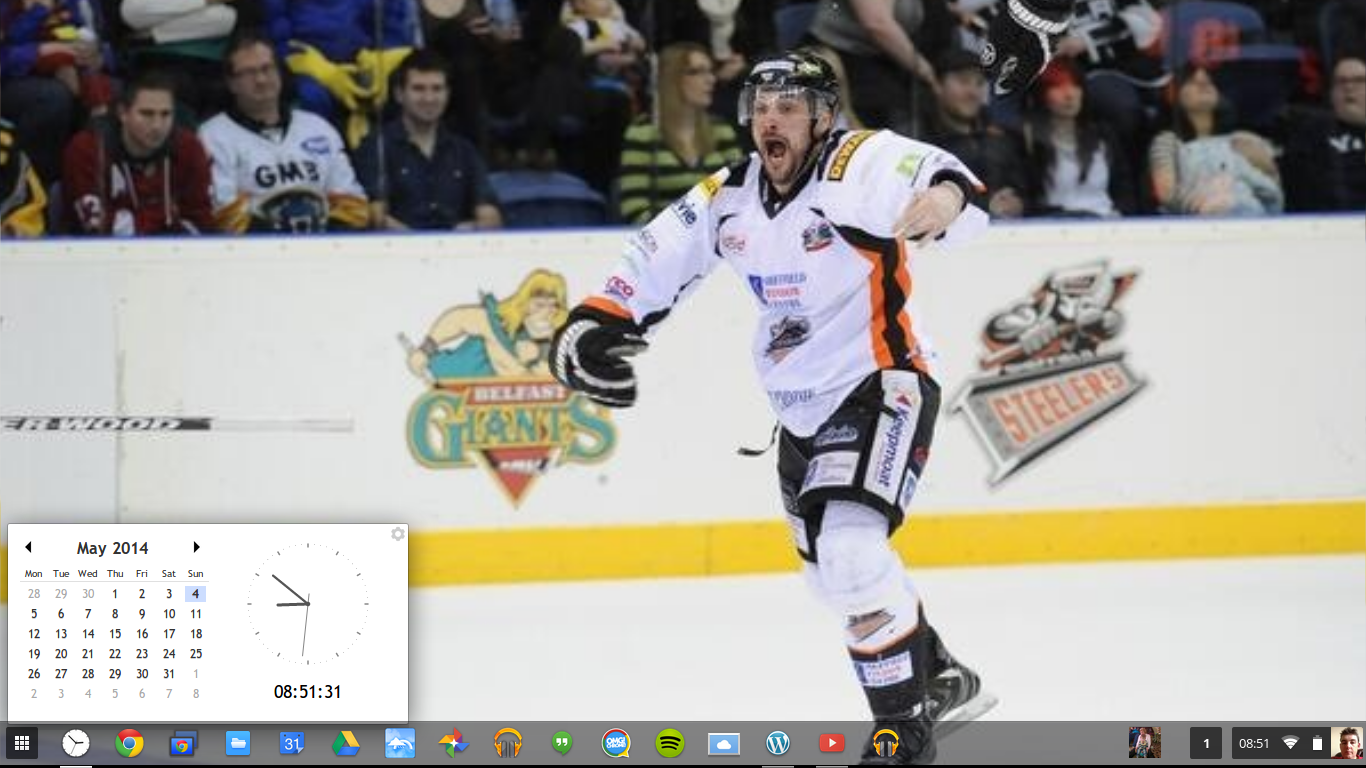
  • Clock Calendar.  Clock Calendar adds a nice convenient Month view Calendar and Clock that can be used like a widget.
Screenshot 2014-05-04 at 08.51.31

    Friday, 1 August 2014

    What’s On My Chromebook Shelf Right Now (August 2014)

    Screenshot 2014-08-01 at 18.03.22

    THE MOST USED APPS ON MY CHROMEBOOK, AND

    WHY THEY’RE THERE


    This is my latest Chrome OS shelf line up that I’ll probably stick with for at least the near future. While my iPhone and Google Nexus 7 Tablet are mainly used for leisure, my Chromebook is used mostly for work, I spend I’ve most of my day, it’s what I use to update this blog and work on various other projects. So I thought I’d do a post in the style of the what’s on my Mac Dock and why, but for Chromebooks, so here’s what’s on my Chromebook Shelf and why. First off we’ll cover some of the stock Chrome apps, and there are a few. The first is Chrome as it’s permanently placed on the Shelf by default, Files as it’s easier than having to go through the App Drawer to find it, finally I've got the Wallpaper Picker as it’s convenient for quickly changing my Desktop Wallpaper. Now onto the rest of my Apps.

    • Clock Calendar.  Clock Calendar adds a nice convenient Month view Calendar and Clock that can be used like a widget.
    Screenshot 2014-05-04 at 08.51.31

      Wednesday, 9 July 2014

      What's On My Chromebook Shelf Right Now (July 2014)

      Screenshot 2014-07-09 at 16.56.16


      THE MOST USED APPS ON MY CHROMEBOOK, AND

      WHY THEY’RE THERE

      This is my latest Chrome OS shelf line up that I’ll probably stick with for at least the near future. While my iPhone and Google Nexus 7 Tablet are mainly used for leisure, my Chromebook is used mostly for work, I spend I’ve most of my day, it’s what I use to update this blog and work on various other projects. So I thought I’d do a post in the style of the what’s on my Mac Dock and why, but for Chromebooks, so here’s what’s on my Chromebook Shelf and why. First off we’ll cover some of the stock Chrome apps, and there are a few. The first is Chrome as it’s permanently placed on the Shelf by default, Files as it’s easier than having to go through the App Drawer to find it, finally I’ve got the Wallpaper Picker as it’s convenient for quickly changing my Desktop Wallpaper. Now onto the rest of my Apps.

      • Clock Calendar.  Clock Calendar adds a nice convenient Month view Calendar and Clock that can be used like a widget.

      Screenshot 2014-05-04 at 08.51.31

        Sunday, 8 June 2014

        What’s On My Chromebook Shelf Right Now (June 2014)

        Desktop 1A


        THE MOST USED APPS ON MY CHROMEBOOK, AND

        WHY THEY’RE THERE

        This is my latest Chrome OS shelf line up that I’ll probably stick with for at least the near future. While my iPhone and Google Nexus 7 Tablet are mainly used for leisure, my Chromebook is used mostly for work, I spend I’ve most of my day, it’s what I use to update this blog and work on various other projects. So I thought I’d do a post in the style of the what’s on my Mac Dock and why, but for Chromebooks, so here’s what’s on my Chromebook Shelf and why. First off we’ll cover some of the stock Chrome apps, and there are a few. The first is Chrome as it’s permanently placed on the Shelf by default, Files as it’s easier than having to go through the App Drawer to find it, finally I’ve got the Wallpaper Picker as it’s convenient for quickly changing my Desktop Wallpaper. Now onto the rest of my Apps.

        • Clock Calendar.  Clock Calendar adds a nice convenient Month view Calendar and Clock that can be used like a widget.
        Screenshot 2014-05-04 at 08.51.31

          Monday, 26 May 2014

          What's On My Chromebook Shelf Right Now (Late May 2014)

          Screenshot 2014-05-21 at 18.01.23

          THE MOST USED APPS ON MY CHROMEBOOK, AND


          WHY THEY'RE THERE


          This is my latest Chrome OS shelf line up that I'll probably stick with for at least the near future. While my iPhone and Google Nexus 7 Tablet are mainly used for leisure, my Chromebook is used mostly for work, I spend I've most of my day, it's what I use to update this blog and work on various other projects. So I thought I'd do a post in the style of the what's on my Mac Dock and why, but for Chromebooks, so here's what's on my Chromebook Shelf and why. First off we'll cover some of the stock Chrome apps, and there are a few. The first is Chrome as it's permanently placed on the Shelf by default, Files as it's easier than having to go through the App Drawer to find it, finally I've got the Wallpaper Picker as it's convenient for quickly changing my Desktop Wallpaper. Now onto the rest of my Apps.

          • Clock Calendar.  Clock Calendar adds a nice convenient Month view Calendar and Clock that can be used like a widget.


          Screenshot 2014-05-04 at 08.51.31

          • Google Calendar. I Use Google Calendar on a daily basis, not always to add events. So it's essential to have Calendar in easy reach.

          • Google Drive. It's essential for me to always have quick access to all of my work with more advanced features than using Files.

          • Full Screen Weather. I use Full Screen Weather, because it's always nice to keep an eye on the weather.

          • Google+ Photos. I use Google+ Photos as it's a nice simple way to view all my photos that are backed up on Google+& even shared to Google+.

          • Google Play Music. I use Play Music as a lot of my music is already stored on Play Music, and having it on the Shelf makes it easy to use when I want to listen to anything.

          • Hangouts call. Hardly ever used, but it's still there if I need it.

          • iCloud. I've replaced WeVideo with iCloud since I never did my Home Office Tour video, an since I've started using my iCloud email address as well as my Hotmail,Outlook & GMail addresses I thought that I might as well add it to my Shelf line up and maybe I'll get some use out of the other iCloud features.

          • OMG Chrome. As it's nice to keep an eye on the latest Chrome & Chrome OS news.

          • Spotify.  I like using Spotify & it's nice to be able to use Spotify from the Shelf.

          • Sunrise Calendar. I've started to use Sunrise Calendar on my iPhone and the Android Beta on my Google Nexus 7 for review purposes, so I thought that it makes sense to use the Chrome/Chrome OS version as well and it has some nice extra features that you don't get in Google Calendar, so Google Calendar has taken a back seat for now.

          • WeVideo. I've added WeVideo to my shelf as I'm planning on doing a tour of my Office/Desk at some point during the next week and thought that it would be an ideal time to experiment with WeVideo, so it's gained a place on my shelf for at least the next few weeks.

          • WordPress.com. Since my blog is hosted on WordPress.com it makes sense to keep the WordPress.com app on the Shelf.

          • YouTube. I watch YouTube videos nearly every day, so keeping the YouTube app on the Shelf makes sense.

          • Google Play Music Mini Player. Having the Google Play Music Mini Player on the Shelf means that I can get access to some of the Google Play Music features without having to go into the Google Play Music app, would be nice to be able to use the Google Play Music Mini Player while the Google Play Music app is closed though.


          That's everything on my Chromebook Shelf. I've got loads of other apps on my Chromebook, but the list I've provided in this post are the select few that I use enough to allow to grace a spot on my Shelf. That's enough about my Chromebook, what about you? Be sure to share your Chrome Shelf setups in the Comments.

          Roland

          Google+

          Sunday, 4 May 2014

          What's On My Chromebook Shelf Right Now (May 2014)

          IMG_0180


          THE MOST USED APPS ON MY CHROMEBOOK, AND


          WHY THEY'RE THERE


          I realize that its only been a few weeks since I last did a What's on my Chromebook shelf right now post but there has been a few minor changes to my shelf setup.

          While my iPhone and Google Nexus 7 Tablet are mainly used for leisure, my Chromebook is used mostly for work, I spend I've most of my day, it's what I use to update this blog and work on various other projects. So I thought I'd do a post in the style of the what's on my Mac Dock and why, but for Chromebooks, so here's what's on my Chromebook Shelf and why. First off we'll cover some of the stock Chrome apps, and there are a few. The first is Chrome as it's permanently placed on the Shelf by default, Files as it's easier than having to go through the App Drawer to find it, finally I've got the Wallpaper Picker as it's convenient for quickly changing my Desktop Wallpaper.

          Now onto the rest of my Apps.

          • Dashboard. I use Dashboard as it adds a Mac OS X style Dashboard to Chrome OS. I've removed Dashboard as it's now stopped working.

          • Clock Calendar. I've replaced Dashboard with Clock Calendar as Dashboard has stopped working, and Clock Calendar adds a nice convenient Month view Calendar and Clock that can be used like a widget.Screenshot 2014-05-04 at 08.51.31

          • Google Calendar. I Use Google Calendar on a daily basis, not always to add events. So it's essential to have Calendar in easy reach.

          • Google Drive. It's essential for me to always have quick access to all of my work with more advanced features than using Files.

          • Full Screen Weather. I use Full Screen Weather, because it's always nice to keep an eye on the weather.

          • Google+ Photos. I use Google+ Photos as it's a nice simple way to view all my photos that are backed up on Google+& even shared to Google+.

          • Google Play Music. I use Play Music as a lot of my music is already stored on Play Music, and having it on the Shelf makes it easy to use when I want to listen to anything.

          • Hangouts call. Hardly ever used, but it's still there if I need it.

          • OMG Chrome. As it's nice to keep an eye on the latest Chrome & Chrome OS news.

          • Spotify.  I like using Spotify & it's nice to be able to use Spotify from the Shelf.

          • WeVideo. I've added WeVideo to my shelf as I'm planning on doing a tour of my Office/Desk at some point during the next week and thought that it would be an ideal time to experiment with WeVideo, so it's gained a place on my shelf for at least the next few weeks.

          • WordPress.com. Since my blog is hosted on WordPress.com it makes sense to keep the WordPress.com app on the Shelf.

          • YouTube. I watch YouTube videos nearly every day, so keeping the YouTube app on the Shelf makes sense.

          • Google Play Music Mini Player. Having the Google Play Music Mini Player on the Shelf means that I can get access to some of the Google Play Music features without having to go into the Google Play Music app, would be nice to be able to use the Google Play Music Mini Player while the Google Play Music app is closed though.


          That's everything on my Chromebook Shelf. I've got loads of other apps on my Chromebook, but the list I've provided in this post are the select few that I use enough to allow to grace a spot on my Shelf. That's enough about my Chromebook, what about you? Be sure to share your Chrome Shelf setups in the Comments.

          Roland

          Google+

          Tuesday, 22 April 2014

          What's On My Chromebook Shelf Right Now

          IMG_0180

          THE MOST USED APPS ON MY CHROMEBOOK, AND


          WHY THEY'RE THERE


          While my iPhone and Google Nexus 7 Tablet are mainly used for leisure, my Chromebook is used mostly for work, I spend most of my day, it's what I use to update this blog and work on various other projects. So I thought I'd do a post in the style of the what's on my Mac Dock and why, but for Chromebooks, so here's what's on my Chromebook Shelf and why. First off we'll cover some of the stock Chrome apps, and there are a few. The first is Chrome as it's permanently placed on the Shelf by default, Files as it's easier than having to go through the App Drawer to find it, finally I've got the Wallpaper Picker as it's convenient for quickly changing my Desktop Wallpaper.

          Now onto the rest of my Apps.


          • Dashboard. I use Dashboard as it adds a Mac OS X style Dashboard to Chrome OS.

          • Google Calendar. I Use Google Calendar on a daily basis, not always to add events. So it's essential to have Calendar in easy reach.

          • Google Drive. It's essential for me to always have quick access to all of my work with more advanced features than using Files.

          • Full Screen Weather. I use Full Screen Weather, because it's always nice to keep an eye on the weather.

          • Google+ Photos. I use Google+ Photos as it's a nice simple way to view all my photos that are backed up on Google+& even shared to Google+.

          • Google Play Music. I use Play Music as a lot of my music is already stored on Play Music, and having it on the Shelf makes it easy to use when I want to listen to anything.

          • Hangouts call. Hardly ever used, but it's still there if I need it.

          • OMG Chrome. As it's nice to keep an eye on the latest Chrome & Chrome OS news.

          • Spotify.  I like using Spotify & it's nice to be able to use Spotify from the Shelf.

          • WordPress.com. Since my blog is hosted on WordPress.com it makes sense to keep the WordPress.com app on the Shelf.

          • YouTube. I watch YouTube videos nearly every day, so keeping the YouTube app on the Shelf makes sense.

          • Google Play Music Mini Player. Having the Google Play Music Mini Player on the Shelf means that I can get access to some of the Google Play Music features without having to go into the Google Play Music app, would be nice to be able to use the Google Play Music Mini Player while the Google Play Music app is closed though.


          That's everything on my Chromebook Shelf. I've got loads of other apps on my Chromebook, but the list I've provided in this post are the select few that I use enough to allow to grace a spot on my Shelf. That's enough about my Chromebook, what about you? Be sure to share your Chrome Shelf setups in the Comments.

          Roland

          Google+

          Advertisement

          BBC News - Sheffield & South Yorkshire