Showing posts with label Google Chrome OS. Show all posts
Sunday, 6 September 2015
My Current Chrome OS Desktop Layout (September 2015)
After a few months away from writing Articles due to commitments that have made it hard for me to update my Blog I'm back with an update on my current Chrome OS Desktop Layout.
Sunday, 5 April 2015
What’s On My Chromebook Shelf Right Now (April 2015)
THE MOST USED APPS ON MY CHROMEBOOK, AND
WHY THEY’RE THERE
This is my latest Chrome OS shelf line up that I’ll probably stick with for at least the near future. While my iPhone and Google Nexus 7 Tablet are mainly used for leisure, my Chromebook is used mostly for work, I spend I’ve most of my day, it’s what I use to update this blog and work on various other projects. So I thought I’d do a post in the style of the what’s on my Mac Dock and why, but for Chromebooks, so here’s what’s on my Chromebook Shelf and why. First off we’ll cover some of the stock Chrome apps, and there are a few. The first is Chrome as it’s permanently placed on the Shelf by default, Files as it’s easier than having to go through the App Drawer to find it, finally I've got the Wallpaper Picker as it’s convenient for quickly changing my Desktop Wallpaper. Now onto the rest of my Apps.
Saturday, 28 March 2015
How I Use My Chromebook
Friday, 27 March 2015
Chrome OS App Launcher To Receive Google Now Make Over
The Chrome OS App Launcher is to receive another update, after the last update that moved the start Men styled App Drawer to a more central App Launcher/Search engine will be given a splash of material design as well as get Google Now cards which until now have only been available in the Notification Centre.
Friday, 26 December 2014
Living In The Cloud: 1 Year on
After spending a year living in the Cloud it’s been a very enjoyable experience that will pobably continue for many years to come as it fits my workflow & usage 100%. As a blogger I need to work in the Cloud so it’s something that I have to do on a regular basis anyway.
{Break}
While lliving in the Cloud takes away the convenience of having locally installed applications it has ment that my Laptop bag is now smaller and lighter as I use an 11.6” Acer C720 Chromebook which has all the benifit of a Laptop in an Ultrabook format without having to pay the premium that an Ultrabook costs.
Thursday, 11 December 2014
New App Launcher Position & Easy Unlock Launched in Latest Developer Channel Release Of Chrome OS
New app launcher position
In the latest developer build of Chrome OS Version 41.0.2243.0 dev (64-bit) Google has made the centered app launcher that has been available for a while under a flag the default launcher position, and while the flag still exists to enable the centered launcher it's inactive as flipping it to disable doesn't do anything.
Monday, 8 December 2014
iWork iCloud Beta Review
Like its Microsoft Office counter part Apples iWork iCloud Beta is as fully featured as its Offline Mac productivity suite. But considering Apple have slimmed down its Offline versions to keep continuity with the iCloud version.
Sunday, 7 December 2014
iPearl mCover For Acer C720/C720P Chromebook Follow-up (Part 3)
I received this comment from iPearl Europe on my last Article in this Follow-up series.
Hi Roland,
We are sending a new set of Acer 720 case to you, if you have not received, it's probably on the way, but it's coming...
and here is my reply to there comment.
Hi,
Ok thanks.
The comment from iPearl came on Thursday the 4th of December when I wrote the Article and my reply was on Friday the 5th of December. From the comment by iPearl Europe I wasn't sure what to expect to receive in the Post, but today Sunday the 7th of December I received two lots of mail which was a shock in itself as there isn't normally any post on Sundays.
Thursday, 4 December 2014
iPearl mCover For Acer C720/C720P Chromebook Follow-up (Part 2)
Wednesday, 26 November 2014
My Current Chrome OS Desktop App Drawer Layout (Late November 2014)
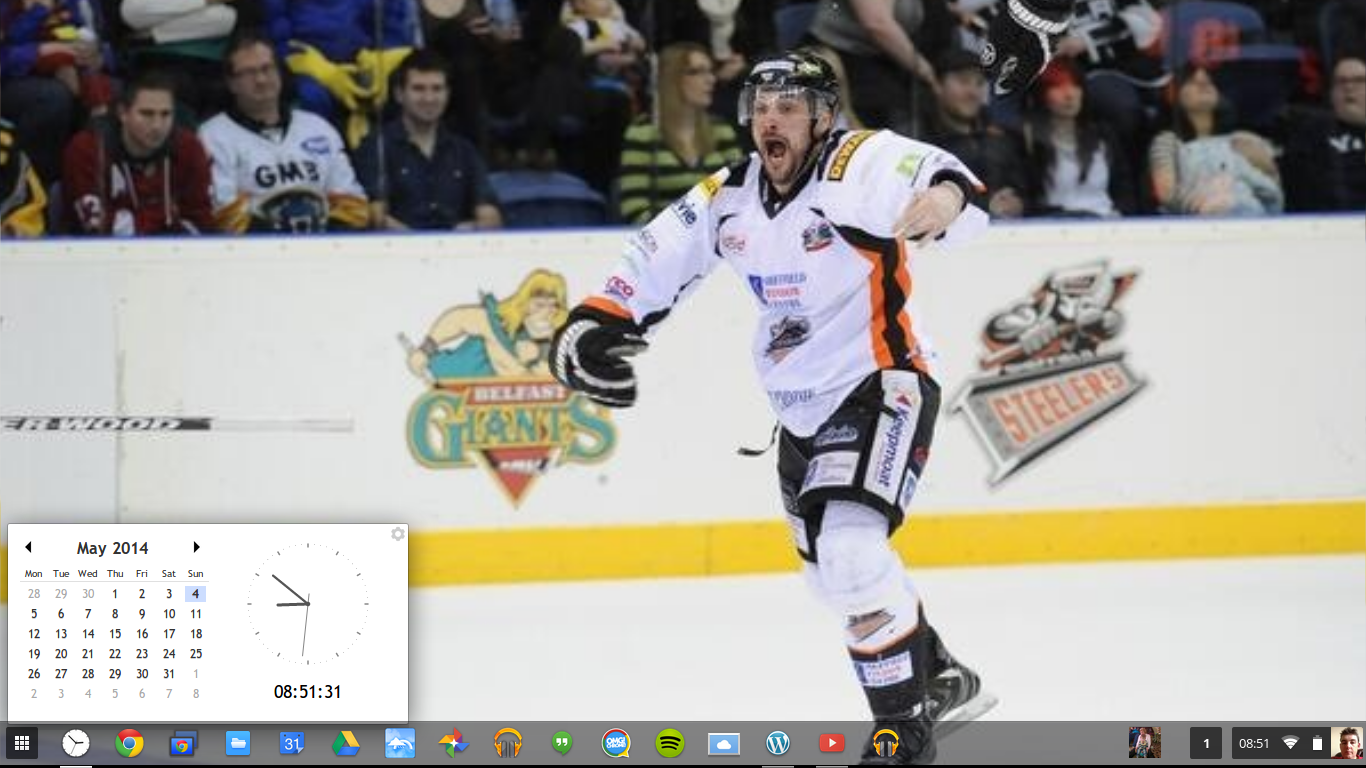
In this post I'll describe the layout of my Chromebook Desktop with a full description to why I've chosen the layout etc.
The Wallpaper is taken from the 2014 EIHL Play-Off Final when my home team The Sheffield Steelers beat the League Champions The Belfast Giants 3-2 in Overtime. Since it's now the Hockey Season I thought it quite fitting to go with a Hockey themed wallpaper.
Tuesday, 25 November 2014
iPearl mCover For Acer C720/C720P Chromebook Follow Up Review (Part 1)
After owning the iPearl mCover 9 months and three days it started to fall apart slightly. The rear folding leg on the left hand side broke on the inside of the base of the case meaning that the leg keeps falling down, making it hard to just slip it into my Laptop bag without having to think carefully how I'm sliding it in, and the rear right corner of the base of the cover where it wraps around the corner of the Chromebook has broken slightly.
| How the rear left corner of the mCover looks un-broken |
| How the rear right corner of the mCover looks broken |
| Rear right fod ut leg broken |
This is despite treating my Chromebook with care therefore while I've been using the mCover I've also been treating that with care, so the cover shouldn't just start falling apart when it's been treated as carefully as the Laptop that it covers. I decided to send an Email to iPearl on Sunday detailing my problems.
To who it may concern,I was shocked at how quickly I got a response from iPearl with it being a Sunday, as they replied to me within a few hours of me sending them an Email.
I bought an iPearl mCover for my Acer C720 Chromebook from your Amazon UK store on the 21st of February this year.After 9 months and three days of owning it the left hand leg has broken meaning that it constantly falls down when not in use, and the right hand rear corner has broken.The case hasn't been treated roughly while in use, so quite why the left leg & right rear corner has broken I don't know.I did a two part review of this cover on my blog over a week when I first received my cover and gave it a very favourable review, had I known that there was these two defects I wouldn't have given it such a favourable review.RegardsMr. Roland Hurt
Thank you for contacting us. We do have a 90 day warranty on our case, however your case is now out of warranty at this time
Thank you,
iPearl Inc
I was a little shocked that they only have a 90 day warranty on their cases as most Manufacturers have a 1 year warranty on their items. This means that since the cover has started to break after their 90 day warranty period I'm left ether with a broken product or out of pocket having to replace it.
Since I'd not left a Review of the cover on Amazon UK even though I'd had the case for over 9 months, it gave me the ideal opportunity to let people looking at the cover know what happens.
If the cover had been a cheap Chinese knock off bough on eBay then I could expect it falling apart quickly, but I bought the cover from the iPearl UK Amazon store, so I'd expect it to last years with care not just to last past its warranty before falling apart.
I'm a little angry that the case has started to fall apart so quickly as it cost me nearly £20 GBP when I got it. For the build quality since it doesn't even last 1 year without starting to fall apart despite been treated as if it's as fragile as the Laptop that it covers then it should be priced in the range of a cheap knock off Chinese cover sold on eBay.
I'm starting to wish that I'd left the second part of the review for a little longer than a week, so I would't have needed to write this Article, but I expected it to be of sufficient enough quality to have lasted years, especially when I first saw these covers reviewed on Android Central.
I said that I'd recommend the iPearl mCover in the second part of my initial review of the cover earlier in the year. If I was to do the same review now I'd have to think long and hard about whether I'd recommend the iPearl mCover or not. based on the fact that it's only covered by a 90 day warranty I'd probably not recommend it, but as it's the only hard shell cover for the Acer C720/C720P then I'd still recommend it but this time with a warning that it's only covered by a 90 day warranty and even if it is treated with care like the Chromebook that it's protecting it'll start to break after the 90 day warranty has expired.
Rant over
Roland
Sunday, 23 November 2014
What’s On My Chromebook Shelf Right Now (November 2014)
THE MOST USED APPS ON MY CHROMEBOOK, AND
WHY THEY’RE THERE
This is my latest Chrome OS shelf line up that I’ll probably stick with for at least the near future. While my iPhone and Google Nexus 7 Tablet are mainly used for leisure, my Chromebook is used mostly for work, I spend I’ve most of my day, it’s what I use to update this blog and work on various other projects. So I thought I’d do a post in the style of the what’s on my Mac Dock and why, but for Chromebooks, so here’s what’s on my Chromebook Shelf and why. First off we’ll cover some of the stock Chrome apps, and there are a few. The first is Chrome as it’s permanently placed on the Shelf by default, Files as it’s easier than having to go through the App Drawer to find it, finally I've got the Wallpaper Picker as it’s convenient for quickly changing my Desktop Wallpaper. Now onto the rest of my Apps.
- Blogger. Since moving my blog over to Blogger from Wordpress I've started using the Blogger Chrome web app to work on my blog.
Clock Calendar. Clock Calendar adds a nice convenient Month view Calendar and Clock that can be used like a widget.
Tuesday, 9 September 2014
Using Chrome Remote Desktop For Gaming In Chrome OS
In earlier Articles I've talked about using Chrome Remote Desktop for using Windows Programs in Chrome OS and for using Microsoft Visual Studio in Chrome OS. While wanting to use Windows Programs in Chrome OS is a slightly more mainstream than wanting to use Microsoft Visual Studio in Chrome OS, there is one area of Computing that's not fully covered by Chrome OS equivalent web Apps is Gaming & this is where Chrome Remote Desktop really comes into its own, there's no performance issues for playing built-in Windows Games, more advanced games might have a problem unless you've got a Multi-Core CPU, a dedicated Graphics Card and lots of RAM.
Tuesday, 2 September 2014
Learning To Program In Microsoft Visual Studio: From A Chromebook &Chrome OS User
While there is the Neutron Drive IDE Web App for Programming in Chrome OS, anyone who wants to learn how to Program in any or all the Languages that come as part of Visual Studio, it's probably best to learn how to Program using Visual Studio since it's the Industry Standard IDE for Programming.
But Visual Studio is expensive!!!! I hear you cry, well that may be true for the Professional & Ultimate Editions of Visual Studio which have been part of the Visual Studio line since 2005. visual Studio Express 2013 is composed of 3 different Editions (Visual Studio Express Web for Developing Web Applications, Visual Studio Express Windows for Developing Windows 8+ Modern UI Apps & Visual Studio Express Windows Desktop for Developing Traditional Windows Programs that run on all versions of Windows) There is also an Express Edition of the server-side Version Control Team Foundation Server that also runs on Client Machines thanks to Windows built-in Web Server IIS. These Express Editions including Team Foundation Server are free to Download & use on as many Windows Desktops or Laptops as you like, Visual Studio 2013 only runs on Windows 8/8.1 so if you're running Windows 7 then you will need Visual Studio 2012. Visual Studio Express takes all the complexity out of Visual Studio Professional or Ultimate.
Thursday, 28 August 2014
Using Chrome Remote Desktop To Use Windows, Mac OS X Or Linux In ChromeOS
While many people call Chromebooks not real Laptops because you can't run programs like Visual Studio or Office on them and the fact that some of the Chrome OS apps that do the same thing are a little lacking in features compared to their Windows, Mac OS X or Linux equivalents.
Google does offer a lightweight and convenient solution for anyone who needs to use Windows, Mac OS X or Linux programs in the form of Chrome Remote Desktop, Chrome Remote Desktop allows you to keep using your Chromebook, Chromebox or Chromebase while being logged into a different OS remotely. This is handy if you need to use a particular program doesn't have a Chrome OS equivalent.
Saturday, 9 August 2014
My Home Office Set-up 2014 (Update 2)
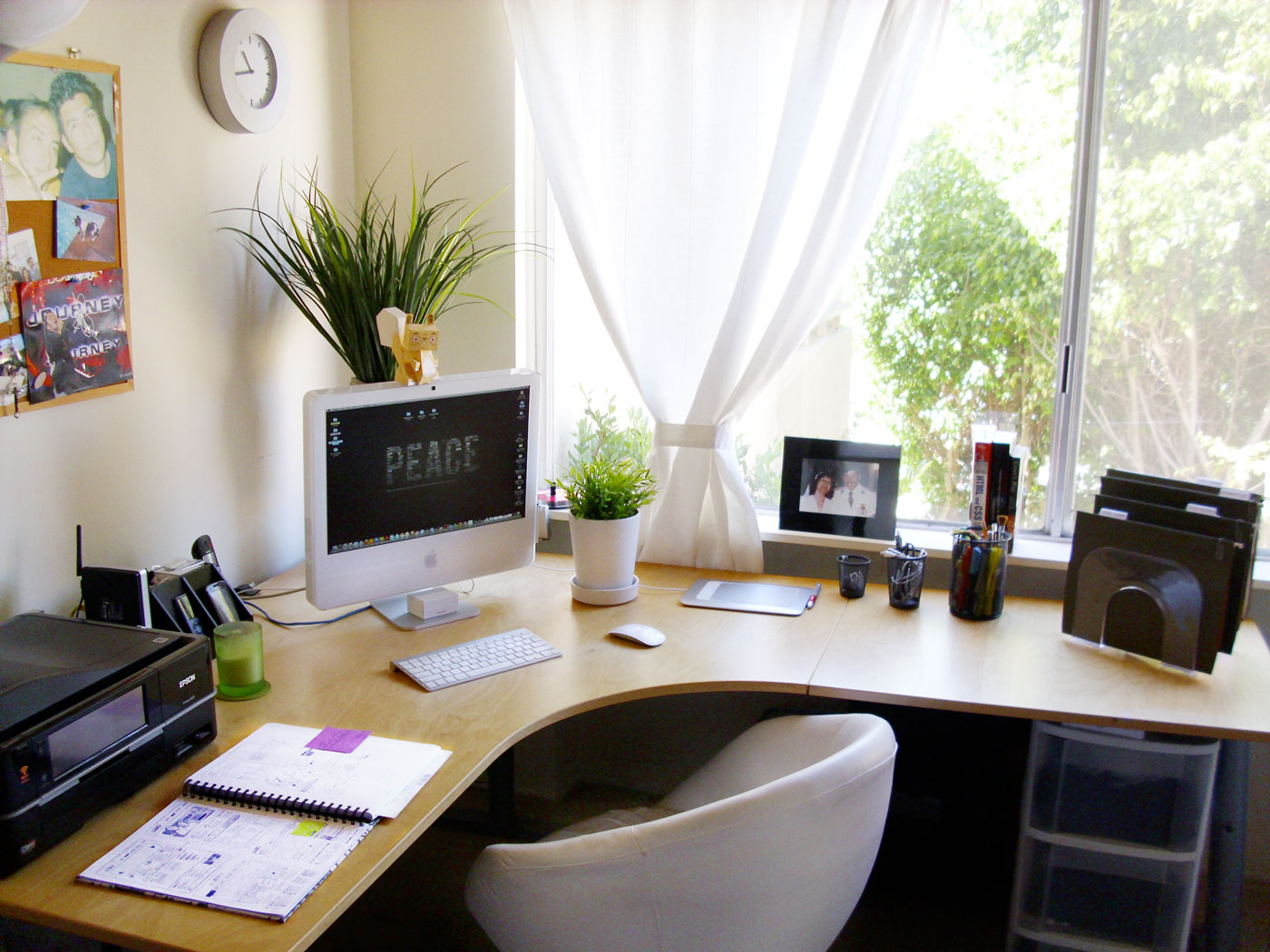
My Home Office setup isn't like the video tours that you see on YouTube, it used to similar at one time. It’s now a lot more modest and minimalistic, but it works well for me. So here’s my text and picture tour of my Home Office as it didn't seem worth while doing a YouTube video. The storage part of my Home Office is an old Computer desk that houses a Box of Printer Paper, a Shredder, a Box of Envelopes and a brown box that has some Computer stuff on the bottom shelf, the Keyboard drawer has an old Microsoft Multimedia Keyboard while the top shelf has a Printer Organizer with mostly odd bits of scrap paper and the charger for my Asus Google Nexus 7, Bluetooth headphones and my Microsoft LifeChat LX-3000 USB Headset & on top of it I've got my Kodak esp 1.2 AIO Printer.
Friday, 1 August 2014
What’s On My Chromebook Shelf Right Now (August 2014)
THE MOST USED APPS ON MY CHROMEBOOK, AND
WHY THEY’RE THERE
This is my latest Chrome OS shelf line up that I’ll probably stick with for at least the near future. While my iPhone and Google Nexus 7 Tablet are mainly used for leisure, my Chromebook is used mostly for work, I spend I’ve most of my day, it’s what I use to update this blog and work on various other projects. So I thought I’d do a post in the style of the what’s on my Mac Dock and why, but for Chromebooks, so here’s what’s on my Chromebook Shelf and why. First off we’ll cover some of the stock Chrome apps, and there are a few. The first is Chrome as it’s permanently placed on the Shelf by default, Files as it’s easier than having to go through the App Drawer to find it, finally I've got the Wallpaper Picker as it’s convenient for quickly changing my Desktop Wallpaper. Now onto the rest of my Apps.
Clock Calendar. Clock Calendar adds a nice convenient Month view Calendar and Clock that can be used like a widget.
Wednesday, 9 July 2014
What's On My Chromebook Shelf Right Now (July 2014)
THE MOST USED APPS ON MY CHROMEBOOK, AND
WHY THEY’RE THERE
This is my latest Chrome OS shelf line up that I’ll probably stick with for at least the near future. While my iPhone and Google Nexus 7 Tablet are mainly used for leisure, my Chromebook is used mostly for work, I spend I’ve most of my day, it’s what I use to update this blog and work on various other projects. So I thought I’d do a post in the style of the what’s on my Mac Dock and why, but for Chromebooks, so here’s what’s on my Chromebook Shelf and why. First off we’ll cover some of the stock Chrome apps, and there are a few. The first is Chrome as it’s permanently placed on the Shelf by default, Files as it’s easier than having to go through the App Drawer to find it, finally I’ve got the Wallpaper Picker as it’s convenient for quickly changing my Desktop Wallpaper. Now onto the rest of my Apps.Clock Calendar. Clock Calendar adds a nice convenient Month view Calendar and Clock that can be used like a widget.
Thursday, 19 June 2014
My Home Office Set-up 2014 (Update)
My Home Office setup isn't like the video tours that you see on YouTube, it used to similar at one time. It’s now a lot more modest and minimalistic, but it works well for me. So here’s my text and picture tour of my Home Office as it didn't seem worth while doing a YouTube video. The storage part of my Home Office is an old Computer desk that houses a Box of Printer Paper, a Shredder, a Box of Envelopes and a brown box that has some Computer stuff on the bottom shelf, the Keyboard drawer has an old Microsoft Multimedia Keyboard while the top shelf has a Printer Organizer with mostly odd bits of scrap paper and the charger for my Asus Google Nexus 7, Bluetooth headphones and my Microsoft LifeChat LX-3000 USB Headset & on top of it I've got my Kodak esp 1.2 AIO Printer.
| Printing station |
Sunday, 8 June 2014
My Current Chrome OS Desktop App Drawer Layout (June 2014)
In this post I'll describe the layout of my Chromebook Desktop with a full description to why I've chosen the layout etc.
The Wallpaper is the stock one from the Mac OS X 10.10 Yosemite Developer beta 1 (also that was used in the WWDC OS X Keynote), if you want to use this Wallpaper then just Google OS X Yosemite Wallpaper.
I'm using the OS X Yosemite Wallpaper as I find it more visually appealing than the Stock Wallpapers that come with Chrome OS.
Subscribe to:
Posts (Atom)