Thursday, 28 November 2013

My Move From Windows 8.1 Pro With Media Centre To Ubuntu 13.10 (Part 2)

Ubuntu-1310

In this second part I'll detail my System spec and explain why Ubuntu 13.10 is better than Windows 8.1 Pro

System Spec


My System is a 15.6" Toshiba C660-15R Laptop that I've had since about 2010, over they years I've upgraded from the stock 2GB of RAM, 250GB HDD & Realtek 802.11b/g/n Wireless Adaptor to 4GB of RAM, 1TB Toshiba HDD and Intel Centrino Advanced N + WiMax Wireless Adaptor that is capable of operating on both the 2.4GHZ & 5.0GHZ Wireless Bands (Wireless Router or Wireless Access Point Capable of Both the 2.4GHZ & 5.0GHZ Wireless Bands required).

Why Ubuntu 13.10 is better than Windows 8.1 Pro


Windows 8.1 Pro can run on my Laptop just fine but it can be sluggish at times and Setup from fresh is pretty long winded with requiring most of the useful software like Office & fully featured Email Clients needing Installing after initiall setup, then all Hardware needs to have Device Drivers individually Installed and a re-boot required after every Driver has been Installed.

Another major annoyance is that Windows requires Activating over the Internet, meaning that if anything goes wrong and you have to do more than a set amount of Fresh Installs in a set amount of time that isn't published as far as I'm aware by Microsoft then you are out of look and will be unable to Activate your copy of Windows (This doesn't affect anyone whose Laptop or Desktop machine came with Windows Pre-Installed) and it will become un-usable after 30 days, leaving you with ether having to download an Activator that will make Windows think it's been Activated or do what I did in March & switch to Linux.

Ubuntu 13.10 runs lightning fast on my Laptop and a Fresh Install is quicker than that of Windows 8.1 Pro and no Device Drivers need to be Installed and Office Software comes Pre-Installed in the form of Libre Office 4.1 and a fully featured Email client in the form of Mozilla Thunderbird 24.1, this greatly speeds up initial setup as you can do everything from wite a letter, an email and browse the Internet as soon as you login. You can then brows the Ubuntu Software Centre for any free or paid application that you then require.

A plus for Ubuntu 13.10 and any other Linux distribution out there is that a license is free and you are free to Install on as many Computers as you like, the only cost involved in running Ubuntu 13.10 or any other Linux distribution is the cost of your Internet Subscription to download the ubuntu.iso and the price of a blank DVD compared to the £100's for a Windows 8.1 Pro License & DVD Pack.

Another plus for Ubuntu is that you can try the latest release from early build's all the way up to final release without having to do a fresh Install all the time (I wouldn't recommend using the development builds as it can be a bit troublesome to someone new to Linux, and the Ubuntu Forums Members aren't always going to know what your problem is due to the vast amounts of different system configurations from specific configurations between different OEM's to a custom build from an OEM like DELL through to a custom home built Desktop, even the systems made and sold by Ubuntu OEM System 76 might not work correctly with the Development builds of Ubuntu due to the bleeding edge software that is used, and as it's a Development build 1 update could quite easily knockout a perfectly working system if there is a small bug or even an incompatibility with another feature. Also to use the Development Build it requires being confident using the Command line to configure text files to make software updates from the Development Branch of the Ubuntu Servers available to you, and sometimes you can go days without getting any updates then get a ton in a couple of hours to days).

Roland

Next                              Previous

Google+

Wednesday, 27 November 2013

My Move From Windows 8.1Pro With Media Centre To Ubuntu 13.10 (Part 1)

Ubuntu-1310

In this new series I'll be documenting my move away from Microsoft Windows 8.1 Pro with Media Centre to Ubuntu Linux 13.10.

In th is first part I'll explain some of the reasons for my move away from Windows 8.1 Pro to Ubuntu Linux 13.10 & why I decided to go with Ubuntu 13.10.

Why I decided to go with Ubuntu 13.10


I decided to go with Ubuntu 13.10 as I'd already got the 64 Bit Ubuntu 13.10 DVD image on my HDD along with DVD image of Pear OS 8 that is a Mac OSX themed version of Ubuntu.  So after I burned both images to DVD's I booted up my trusty Toshiba Satellite C660-15R Laptop that I've had since 2010 with the freshly burned Pear OS 8 DVD in the DVD Drive and booted into Live mode and gave Pear OS 8 a quick look, but despite it looking very much like Mac OSX the icons don't look anything like the ones that Apple use in OSX as the Developers of Pear OS decided to use an iOS styled icon set, & the Windows buttons are too small compared to the OSX ones.

I then re-booted to the Live Ubuntu 13.10 session with the Ubuntu 13.10 DVD and preferred the more slick & polished look of Ubuntu compared to that of Pear OS 8, and since I've used Ubuntu on & off since about late 2009 to mid 2010 I felt at home with the style of Ubuntu, I've also been an on and off Linux user since about 2006/7 and used to love using Suse Linux then OpenSuse, but once the default Desktop Environment in OpenSuse KDE added the Plasma Desktop (Widgets) and made them unable to be switched off fully& then the way that there was 2 different Network Managers making it hard for new users or users returning to OpenSuse from a different Distro virtually impossible to get online. Also the Ubuntu Forums are very well laid out and the users are very knowledgeable and friendly compared to the poorly laid out but equally as  knowledgeable and friendly OpenSuse Forums.

 The reasons for my move away from Windows 8.1 Pro to Ubuntu Linux 13.10


I decided to move away from Windows 8.1 Pro to Ubuntu 13.10 due to an annoyance that seems to have popped up with the inability burn Audio CD's from both iTunes & Windows Media Player, which is annoying when I want to burn Audio CD's to play in the car, also the Metro UI Modern UI has made Windows Bloated and Annoying to use at times, especially when you want to do something quick.

Roland

Next


Google+

Saturday, 5 October 2013

Spam Comments What's The Point?

Are the people behind the Spam Blog Comments that are just full of random words strung together that make no sense and full of random links stupid? Do they actually think that Blog Authors are actually going to approve these useless Comments that are

A) Don't make any sense and are full of Links.
B) Mostly off topic to the Post that they have commented on.

I can't decide if Spam Comments are by other Bloggers that haven't got as big of a following as the Blog that they Spam in hope of

A) Getting Spammed Blog down ranked by search engines due to Spam Comments.

B) Idiots that have nothing better to do with their time than leave Spam Comments on Blogs.

or Bots that just trawl the Net Spamming every single Blog there is.

But I thank god that I decided to use wordpress.com when I started Blogging as the Akismet Spam filter built into WordPress does a pretty good job of filtering out Spam Comments even though the odd one or two Spam Comments slip through the filter and every now and again I get the occasional off topic Comment.

But that still doesn't answer my question about What's the point of Spam Comments as all Spam Comments do is waste the time of Blog Authors who have to go through the Comments and delete all Spam, and that takes time away from them producing great content that people actually want to read, and it's a waste of Spam Commenter's time as none of the Spam Comments are actually going to get Approved by Blog Authors.

Rant Over

Roland


Google+

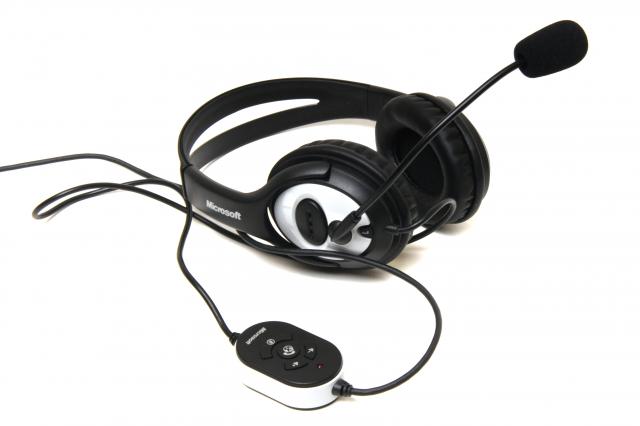
Microsoft LifeChat LX-2000 Review

Microsoft LifeChat LX-2000


Like the Microsoft LifeChat LX-3000 the Microsoft LifeChat LX-2000 is a combined Headset & Microphone, the only difference between the LX-3000 & the LX-2000 is that the LX-2000 is mainly a headset to use with a Laptop,  as it features a behind the head style headband and the Headset folds up and fits in an included case, like the LX-3000 the LX-2000 also sports an in-line remote, but it's a little more basic compared to the LX-3000 and the LX-2000 sports a pair of 3.5mm plugs that go into the soundcard Headphone & Microphone ports so it's not as neat a solution as the LX-3000 that uses a USB Port for connection, but for a headset that is more suited to a Laptop or Netbook it does save a USB Port that are rare on portable devices.

Roland
Google+

Microsoft LifeChat LX-3000 Review

Microsoft LifeChat LX-3000

This is my first review post in a while, and I've decided to do a review of the Microsoft LifeChat LX-3000 Headset & Microphone.  While this headset isn't a top of the range headset it's ideal for use as a gaming headset with or without the use of the Microphone, for listening to music while  working, watching movies, YouTube videos or DVD's, Video chatting using Google Hangouts or Skype and for voice recognition Dictation.

The Headset connects to a PC or Laptop via a standard USB cable and has an in-line remote has a volume Up and Volume Down button, a Microphone Mute Button and a Call button for Windows Live Messenger, but as far as I can see it doesn't seem to work with the Windows 8 version of Skype or any other  Windows 8 Voice Messaging app, it may work with Desktop  versions of Skype etc. but it still should work with Skype etc. without the use of the Call Button.

I purchased the Headset for use while Gaming or watching YouTube videos instead of using the ear-buds that came with my phone.

Roland

Google+

Sunday, 29 September 2013

Plusnet Unlimited Broadband Review

After Upgrading from the now discontinued Plusnet Extra Broadband with a 60GB Monthly allowance to the Broadband Unlimited Package last month we've been unable to get to anywhere near where we were when we were on the 60GB Allowance.

If you want a truly Unlimited Broadband Package that is good value for money then go with Plusnet Broadband Unlimited, but you will be better upgrading your Router to the Netgear DGN 2200 ADSL 2+ Modem Router as the one that  Plusnet provided is cheap and tacky with an Admin Control panel that isn't user-friendly or the most intuitive of UI's.

Since I originally wrote this review the Netgear DGN 2200 ADSL 2+ Modem Router that we were using suffered a major failure after doing a Firmware update and we have since replaced the Router with a Belkin one, and I'll do a quick review of the Router in a couple of weeks time.

This Review was originally posted on my old Blogger Blog, but I've decided that I should migrate it over to my WordPress Blog for continuity with the series that preceded it. Original Post date was 09/02/2013.

Roland


Google+

The One Thing That I've Enjoyed While Using Blogger

The One Thing That I've Enjoyed While Using Blogger is the lack of off topic and Spammy comments, but that's probably due to the fact that I never got any comments while I was actively used Blogger due to the fact that I couldn't get a decent amount of followers & viewers.

WordPress really needs to sort out its Akismit Spam filter as it's awful at filtering out Spam from legitimate comments, as when I re-started using WordPress this morning out of 40 Comments that I'd got 3 were correctly filtered to the Spam folder and out of the 56 that were filtered to the pending folder approximately half were in correctly filtered as legitimate comments that I'd then got to sort through manually.

Rant over

Roland


Google+

Advertisement

BBC News - Sheffield & South Yorkshire