

Showing posts with label Mobile/Cell Phones. Show all posts
Showing posts with label Mobile/Cell Phones. Show all posts
Wednesday, 4 February 2015
My Return To The Nokia Lumia 925

Saturday, 29 November 2014
Huawei E5330 Mobile WiFi Router Review

After using the Huawei E5330 Mobile WiFi Router for a few months it's a very capable little router that's very pocketable, this means that there is no excuse to forget to take it with you where ever you go.
Wednesday, 20 August 2014
Google Photo Sphere Camera Comes To iOS

Google has previously extracted the Photos App from Google + only for Android and Hangouts on all supported Mobile Platforms, but making a feature of an App as a dedicated App only available on iOS is a first for any developer.
Monday, 18 August 2014
Powermat Wireless Charging Kit For iPhone 4/4S Review
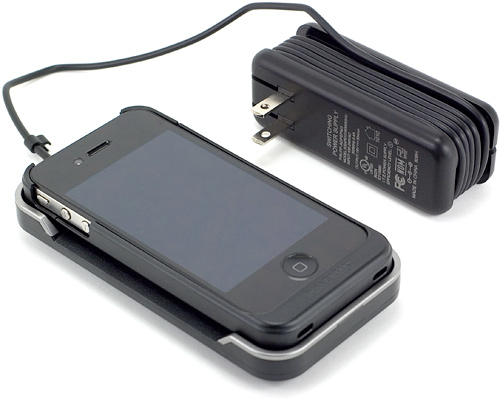
After using the Powermat Wireless charging kit for iPhone 4/4S for a week and a day, it's changed the way that I use my iPhone 4S as I don't have to remember to plug it in to charge it or un-plug it when I need to go out. All I have to do now is just place it in the charging dock to charge it and take it out of the charging dock when I use it or go out.
Other than the sheer convenience of not being tethered to the mains while charging and having to remember to un-plug it when I go out it seems to charge my phone a lot quicker than using a wired charger, which means I don't have to worry about running out of power while out if I've put it on charge before going out and it not getting a decent charge. The audible sound when placing the phone in and removing the phone from the charger is handy when I've got my phone on silent as I know when it's started charging.
Saturday, 9 August 2014
Powermat Wireless Charging Kit For iPhone 4/4S Unboxing/FirstImpressions
Unboxing
The Powermat Wireless Charging kit for iPhone 4/4S comes with the Powermat Wireless charging dock, Universal Power Supply, UK and EU Plug adaptors (the US version comes with a US only Power Supply) along with an iPhone 4/4S Wireless charging case with USB Pass through & a Micro USB to USB Charging cable and various bits of documentation.
Wednesday, 6 August 2014
Huawei E5330 Mobile Wi-Fi Modem Router Unboxing & First Impressions
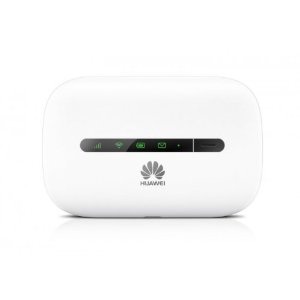
Firstly I'd like to say sorry for the somewhat poorly taken pictures but I didn't have much time to take the unboxing pictures.
Unbagging
In the Currier Shipping bag there was the device its self and a Contract Sim Pack.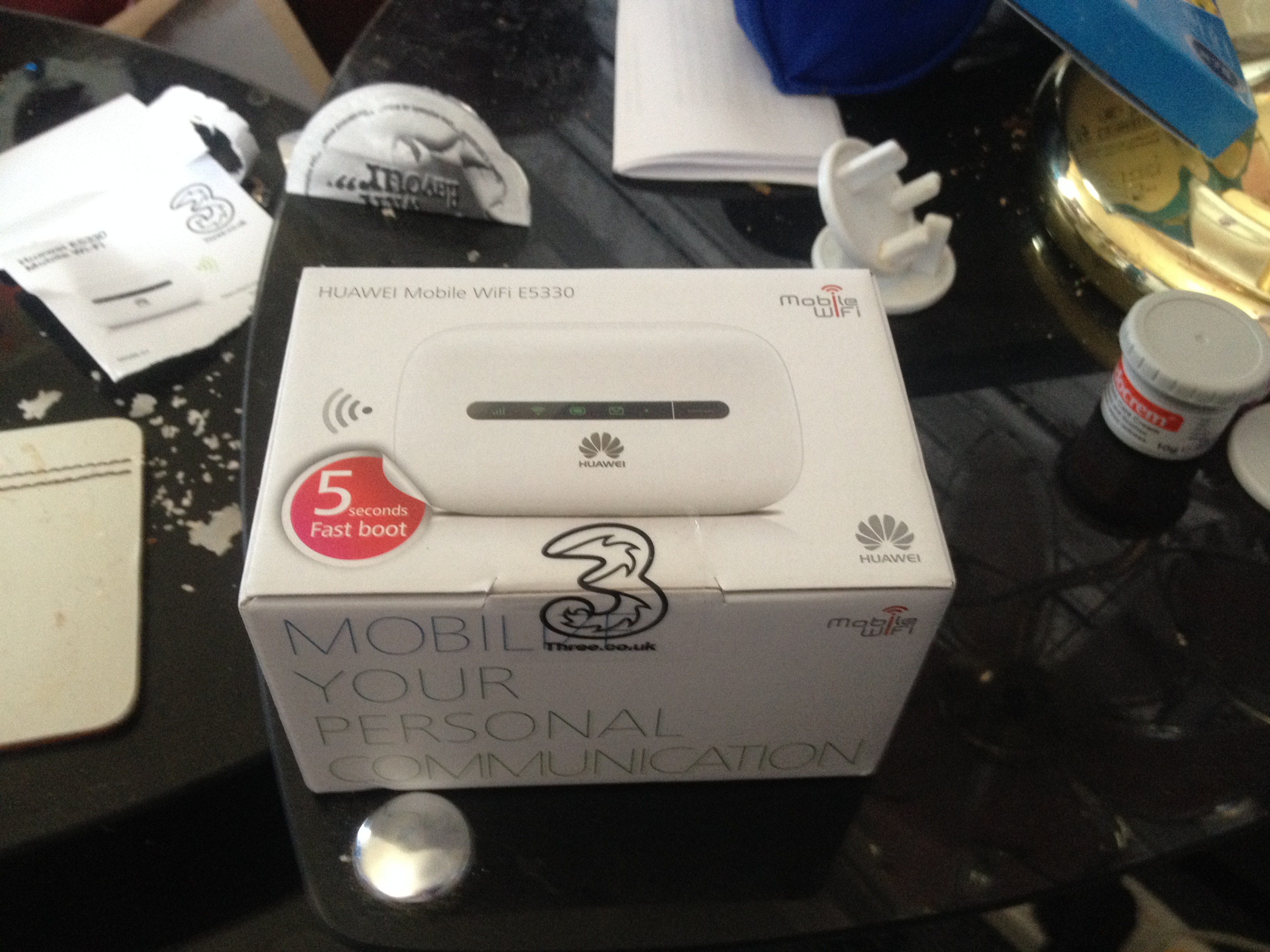 |
| Huawei Mobile WiFi E5330 Box |
Friday, 6 June 2014
11 iOS 8 Features That Are Game Changes For Apples Mobile OS

With this year being the year off for new hardware announcements at Apples WWDC event all eyes were on OS X 10.10 Yosemite and iOS 8. So here are the 8 new features announced for iOS 11.
- A new improved Messages.
- Improvements to Mail.
- Home Kit.
- Health Kit.
- Siri improvements.
- Photos improvements.
- Improvements to the iOS Keyboard.
- iCloud Drive.
- Widgets in Notification Centre.
- Actionable Notifications.
- 3rd-Party Keyboards.
Friday, 30 May 2014
Apple Buys Beats Electronics

Apple yesterday confirmed that it is buying Beats Electronics for $3 billion (£1.8 billion approx), Beats Electronics are the company that teamed up with HTC for a line of beats Audio Android Phones. When HTC dropped the beats Audio line last year in favour of their newly developed Boom Sound that first appeared in the HTC One M7, Beats then developed the Subscription based streaming music service beats music which is currently only available in North America at present like Apples own iTunes Radio.
Thursday, 29 May 2014
Sunrise Calendar For Android Beta Review

After using Sunrise Calendar for Android Beta to me it seem lacking compared to other Calendars on Android.
Sunrise Calendar has a lot of cool features like I mentioned in my combined review, but only having two different Calendar views seems like the developers are trying to create a one size fits all Calender for all the supported Mobile OS's especially since Android Cell Phones come in more varied Screen Sizes than iPhone's meaning that they could have created a totally different version that for Android that caters tor the varied Screen Sizes that Android devices come in instead of doing what seems like port the iOS version over to Android.
Although I prefer the stock Android Calendar to the Sunrise Calendar for Android Beta I'll keep it installed on my Google Nexus 7 & maybe do a follow-up post if anything changes during the Beta or do a follow-up post when it comes out of Beta.
but for now there are plenty of better Calendars available on Android that beat Sunrise on features, even if they don't have the cool features that's part of Sunrise Calendar.
Roland
Tuesday, 27 May 2014
Sunrise Calendar for iOS Review
After using Sunrise Calendar for iOS for a week i’ve hardly used it compared to the stock iOS Calendar.
Sunrise Calendar on iOS is ok but compared to the stock iOS Calendar it’s a little lacking, but the biggest thing lacking from Sunrise Calendar is missing from all third-party iOS Calendars and that’s the ability to launch a third-party Calendar from the Notification Centre. This problem isn't caused by third-party Calendars not being coded properly for iOS 7 but iOS not having the ability to set a third-party Calendar as the default.
If Apple introduced this feature it’d make iOS a little less strict than it is, but then it might cause people to move away from the stock iOS apps to third-party ones which could then introduce problems for iOS and Mac OS X users that use say Sunrise Calendar on their iOS device and the stock Calendar on their OS X computer leaving potential problems with syncing between Calendars.
I like Sunrise Calendar in Chrome/Chrome OS, and if the iOS version had the same month view as the iOS version then I might be inclined to stay with sunrise Calendar over the stock iOS Calendar.
Sunrise Calendar has many good features that I mentioned in my combined review, but the lack of the ability to make Sunrise Calendar as the default Calendar makes it a deal breaker for me, and I can always add my Google Account onto my iPhone to get my Google Calendar events on the stock Calendar.
Roland

Saturday, 14 December 2013
The Curse Of The USB Cables

This post has been written out of frustration after coming to charge my Bluetooth Headset only to discover that it's Mini USB.
I decided to charge my Bluetooth Headset that I've not used for months only to discover that it's Mini USB & The only USB Chargers at hand were the Micro USB Charger for my 2012 Google Nexus 7 that I also use to charge other devices & the Apple Dock Connector cable, no problem I thought as I proceeded to search cupboards & drawers in the living room knowing that a Mini USB cable was living somewhere in there.
But no Mini USB Cable turned up, but aUSB to Mini USB plug & the shortest USB Cable imaginable turned up.
Now it's not as though the Bluetooth Headset is that old as I've had it since last year, also it's not like there are many devices around that use Mini USB anymore so why can't Accessory manufacturers get up-to speed?
Since September 2010 when I got my Blackberry Curve 8510 all the phones I've used have been Micro USB with the exception to my current phone (iPhone 4S) which uses the Dock Connector that Apple introduced with the 1st generation iPod.
even the Bluetooth keyboard that I use with my Google Nexus 7 has a Micro USB Port and the Bluetooth keyboard Case that I'm using on my iPhone 4S has a Micro USB Port.
People always talk about fragmentation in the Android Mobile OS, but no one ever says anything about the fragmentation within the Accessories that use USB for charging. USB is supposed to be universal since USB stands for Universal Serial Bus, but yet there is fragmentation within the plugs & ports for the mobile side of a universal standard.
Rant over
Roland
iOS 7 Shared Photo Stream Bug
In this post I'm going to talk about 2 possible bugs in the iOS 7 implementation of Photo Stream & my work around. My iPhone 4S came with iOS 7 pre-installed so I don't know if it was present in iOS 6.
I first spotted this bug when I first set-up a shared Photo Stream between me and the wife. The original Invite when I set the Photo Stream up never went through, so today I tried doing it again and it didn't go through.
Since Apple in their infinite wisdom never implemented a Delete Invite option I was unable to delete her Invite and start again.
the only way I could get the Invite to go through was to delete the Photo Stream and re-create it and her Invite went through and she was able to accept the Invite.
Once I'd re-created the Photo Stream and added some Photos I was then unable to add anymore Photos or Videos, the Photos app would just freeze and I'd have to return back to my Home-screen & close the app through Multi Tasking.
the only way I could get Photos to add was to delete all the Photos in the Photo Stream and re-boot by holding down the Sleep/Lock button until the screen went blank and I was able to add Photos as normal.
I've got no idea if these are a bug or due to hardly ever re-booting my phone meaning that the RAM needed flushing by doing a re-boot.
Roland
Inviting people to a shared Photo Stream
I first spotted this bug when I first set-up a shared Photo Stream between me and the wife. The original Invite when I set the Photo Stream up never went through, so today I tried doing it again and it didn't go through.
Since Apple in their infinite wisdom never implemented a Delete Invite option I was unable to delete her Invite and start again.
The solution
the only way I could get the Invite to go through was to delete the Photo Stream and re-create it and her Invite went through and she was able to accept the Invite.
Adding Photos to a shared Photo Stream
Once I'd re-created the Photo Stream and added some Photos I was then unable to add anymore Photos or Videos, the Photos app would just freeze and I'd have to return back to my Home-screen & close the app through Multi Tasking.
The solution
the only way I could get Photos to add was to delete all the Photos in the Photo Stream and re-boot by holding down the Sleep/Lock button until the screen went blank and I was able to add Photos as normal.
Conclusion
I've got no idea if these are a bug or due to hardly ever re-booting my phone meaning that the RAM needed flushing by doing a re-boot.
Roland
Tuesday, 12 October 2010
Otter BOX Defender Series Case Vs A Normal Case
After purchasing an Otter BOX defender Series case for my BlackBerry Curve 8520 I've got to say it's well worth the money as it feels a lot stronger than the generic Hard case that I bought.
The clear cover that goes over the keypad protects it from getting dirty and bits getting in to the phone through the keypad, The Hard shell feels a lot stronger than the the generic hard case that I was using previously and I like the clear protector that goes over the camera lens to protect it from getting scratched and the silicone outer skin is a lot stronger than a normal form fitting silicone skin and I like how their is a flap that covers the Micro USB port and the headset socket to protect them from letting dust into the phone. The only open parts of the case are just the microphone on the bottom of the case and the speaker on the top of the case as well as the handset speaker for non headset or speaker phone calls. The provided belt clip holster is a nice addition to the package as the Otter BOX makes the phone very bulky and heavy. The plus point of having a heavier and bulkier phone is that you are less likely to drop the phone compared to an un protected Curve as they are very light.
Roland
The clear cover that goes over the keypad protects it from getting dirty and bits getting in to the phone through the keypad, The Hard shell feels a lot stronger than the the generic hard case that I was using previously and I like the clear protector that goes over the camera lens to protect it from getting scratched and the silicone outer skin is a lot stronger than a normal form fitting silicone skin and I like how their is a flap that covers the Micro USB port and the headset socket to protect them from letting dust into the phone. The only open parts of the case are just the microphone on the bottom of the case and the speaker on the top of the case as well as the handset speaker for non headset or speaker phone calls. The provided belt clip holster is a nice addition to the package as the Otter BOX makes the phone very bulky and heavy. The plus point of having a heavier and bulkier phone is that you are less likely to drop the phone compared to an un protected Curve as they are very light.
Roland
Subscribe to:
Posts (Atom)